Billing at the counter, stock on the shelf, staff on shift, deliveries at the door, repairs on the bench. G2GposPro joins them so you stop copying numbers between a notebook, a spreadsheet and three apps.
Bill in seconds, with a barcode scanner or by typing three letters of a name
GST invoices where you are registered, plain bills where you are not — decided by the system, not by the cashier
Add only the parts you need, and switch them on per outlet
Most shops do not lose money on any single thing. It leaks: an hour re-counting stock, a discount nobody approved, a delivery that never arrived, a staff member paid for a shift they did not work. Each is small. Together they are the difference between a good month and a flat one.
1
The counter slows down at the worst time
Six people waiting, and the cashier is hunting for a price. The till holds your whole catalogue offline, finds a product from three letters, and remembers what each customer usually buys.
2
Nobody quite knows what is in stock
Stock moves on every sale, purchase, transfer and return without anyone typing it in twice. When a count disagrees with the system, you can see the exact entries that caused it.
3
Tax is either wrong or terrifying
If you hold a GST registration, the system raises tax invoices. If you do not, it will not let anyone issue one by accident — which is the mistake that costs money later.
4
Staff hours are an argument, not a record
Staff clock in from their own phone, at the shop, with the location recorded. Attendance becomes a fact rather than a memory, and payroll reads it directly.
5
Deliveries disappear between the counter and the door
Take the address at the till, hand the sale to a driver, and follow the bike on a map. If nobody was home, that gets recorded as what it was, not as delivered.
6
Repairs live on paper
Job in, technician assigned, parts costed, estimate approved by the customer before work starts. No more "he said it would be fifteen hundred".
The counter, in detail
This is where the shop spends its day, so it gets the most attention. The till runs in a browser, on a cheap laptop or an old desktop, and does not fall over when the connection does.
Keeps selling when the internet drops
The catalogue is held on the machine. If the line goes down mid-queue, billing continues and syncs when the connection returns. A dropped connection is an inconvenience, not a closed shop.
Finds anything, three ways
Scan a barcode, type part of a name, or tap a category tile. Weighing-scale barcodes are read correctly, so loose goods do not need a separate flow.
Prices that match how you actually sell
One price per customer group, quantity slabs for wholesale, and per-item overrides where a manager approves them. A cashier cannot quietly discount a line.
Every way people pay
Cash, card, UPI, credit against a customer account, or split across several at once. Credit checks the customer limit before the sale, not after.
GST decided by your registration
The bill type follows whether a tax number is on file, and the cashier is not asked to choose. A shop below the threshold cannot issue a tax invoice by mistake; a registered shop cannot forget to.
Home delivery from the till
Tick delivery, take the address, pin it on a map, and the sale enters the dispatch queue with a delivery charge set per outlet. The manager sends it out with a driver.
Cash drawer that reconciles
Open with a counted float, close with a counted total, and see the difference along with every sale and payment that made it up.
Prints on whatever you own
Thermal rolls and A4, twelve layouts, with a different design for GST and non-GST bills. The delivery charge prints on all of them.
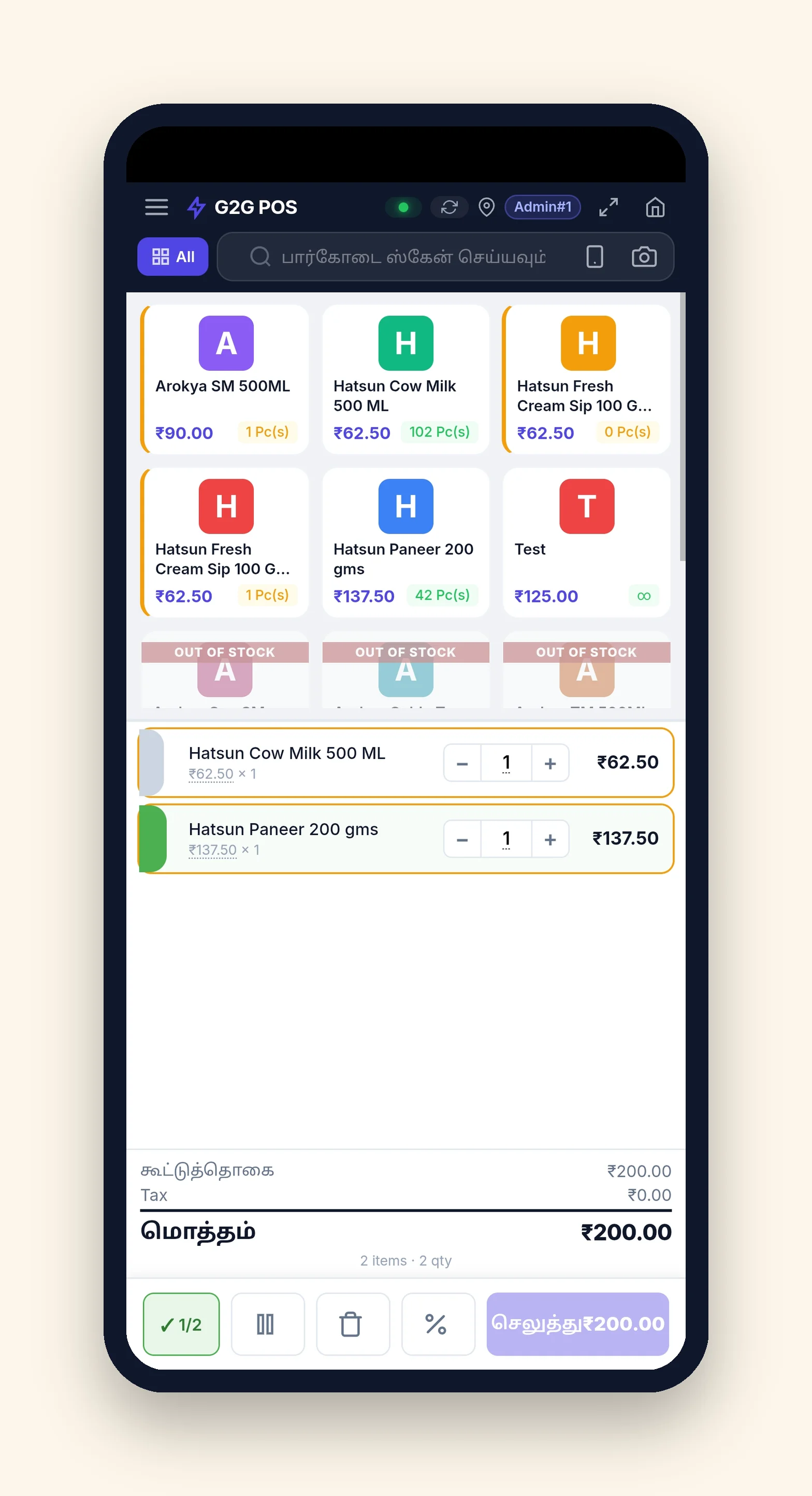
The same till, on the phone in your pocket
Not a cut-down companion app — the counter itself, sized for one hand. Install it straight from the browser and it opens full screen with its own icon, like any other app.
Installs from the browser
Open the till on a phone and add it to the home screen. No app store, nothing to download, nothing to approve — and it updates itself the next time it opens.
In your language, per person
The search box, the totals and the payment button all read in Tamil, Hindi, Malayalam, Telugu, Kannada or English. Chosen per user, so the owner and the cashier can each use their own.
Keeps billing with no signal
The catalogue and the day's sales sit on the phone itself. Billing carries on through a dead patch and syncs when the line comes back — the same offline engine the desktop till runs.
The camera is the scanner
Point the phone camera at a barcode. Pack codes and weighing-scale labels are read correctly too, so a phone is a whole counter and not just a window onto one.
Any reasonably current Android phone or iPhone. No dedicated hardware, and no separate licence — a phone is another way into the till you already pay for.
The modules, one by one
Each one is separate. Take what earns its keep and leave the rest — you can add any of them later without touching what already works.
Point of Sale
Included with the till
The counter itself — billing, payments and the cash drawer.
A till built for a queue rather than a demonstration. It holds your catalogue on the machine so billing survives a dropped connection, finds products from a barcode or three letters, and decides GST or non-GST from your registration instead of asking the cashier.
Works offline and syncs when the line returns
Barcode, name search and category tiles, including weighing-scale labels
Cash, card, UPI, credit and split payments
Customer accounts with a credit limit checked before the sale
Twelve print layouts, thermal and A4, separate GST and non-GST designs
Cash drawer open and close with a counted reconciliation
Sales orders, drafts and held bills
Home delivery captured at the counter with a per-outlet charge
Who it is for: Every shop. This is the part everyone uses all day.
Why it is included: The till itself: billing, payments, the cash drawer and the stock it moves.
Different price at different quantities, without a mental calculation.
Sell one at retail and a dozen at wholesale from the same product record. Slabs apply automatically as the quantity changes, so the cashier never works out which rate applies and a wholesale customer is never charged retail by accident.
Price bands by quantity, per product or per variation
Cumulative pricing, where the whole quantity takes the reached rate
Applied at the till as the quantity is typed
Server-side enforcement, so a stale screen cannot undercharge
Who it is for: Kirana, wholesale, and anyone selling the same item in singles and cases.
Why it is included: Quantity pricing — a lower rate above a quantity you set, worked out at the counter instead of in the cashier's head. Included with the till rather than sold on, so the price a shop quotes for a dozen is never a manual calculation.
One product, many sizes, one place to manage them.
A shirt in five sizes, oil in three tin sizes, or a spare part in two grades stays one product with several variations, each with its own barcode, stock and price band. It also holds the price-band data that quantity pricing reads.
Variation matrices generated rather than typed one by one
Separate barcode, stock and price per variation
Owns the price-band storage used by quantity pricing
Bulk price updates across a variation set
Who it is for: Anyone whose products come in sizes, grades or pack counts.
Why it is included: Products, variations and units of measure: one product in several sizes, and the packs it arrives in. This is where a box of twelve becomes something the till can sell either way.
Run an offer without trusting the counter to remember it.
Set up a buy-two-get-one, a percentage off a category, or a threshold discount, and the till applies it as the basket is built. The cashier sees what was applied and why, and so does the customer on the bill.
Basket-level and item-level offers
Date and time windows, so a weekend offer ends by itself
Applied and shown live as items are added
Redemptions recorded, so you can see what an offer actually cost
Who it is for: Shops that run festival or clearance offers and want to know the result.
Customers earn points on what they spend and redeem them against a later bill. Earning and redemption rates, minimum basket and maximum redemption per bill are all set by you, and the balance shows at the counter when the customer is selected.
Earn rate per rupee, set per business
Minimum basket to earn, maximum redemption per bill
Balance and redemption shown during billing
Full ledger of what was earned and spent
Who it is for: Neighbourhood shops competing on relationship rather than price.
Control what appears on a bill and where: logo, registration details, terms, a QR code for payment, and separate designs for GST invoices and plain bills. Set it once per outlet.
Layouts for thermal rolls and A4
Separate GST and non-GST designs
Logo, terms and footer per outlet
Payment QR on the bill
Who it is for: Shops that hand a bill to a customer and care how it reads.
Send the bill where the customer will actually see it.
Send a bill, a payment reminder or an order update over WhatsApp from the same screen you raised it on. Also carries the login codes for your own staff, so nobody waits on an SMS that never arrives.
Bill sent to the customer as they leave
Payment reminders for credit accounts
Login verification codes for staff
Message history against the customer record
Who it is for: Shops with credit customers and repeat business.
Purchases, supplier returns, transfers between outlets and physical counts, all recorded so the stock figure has a history behind it. When a count disagrees with the system, you can see the entries that explain the gap instead of guessing.
Purchase entry with supplier and cost tracking
Transfers between outlets with a receiving step
Physical stock counts with a variance report
Batch and expiry tracking where you need it
Every movement traceable to the document that caused it
Who it is for: Any shop holding more than a few hundred lines, and every multi-outlet business.
Reads what actually sold, at what rate, and how long a supplier takes, then suggests what to order and how much. It is a starting list for your purchase decision, not an automatic order.
Suggestions based on real sales rate, not a fixed minimum
Supplier lead time taken into account
Fast and slow movers separated, so dead stock is visible
Export a suggested order to work from
Who it is for: Shops where money is tied up in the wrong stock.
Record the loss properly so the numbers stay honest.
Breakage, spoilage and expiry recorded against a reason, a cost and a person. Stock comes down, the loss lands where an accountant expects it, and the pattern becomes visible over a few months.
Reason codes, so losses can be grouped and compared
Value of the loss recorded, not only the quantity
Approval before a write-off is committed
Reporting by reason, product and period
Who it is for: Grocery, fresh produce, and anyone with breakable or perishable stock.
Staff clock in from their own phone at the shop, with the location recorded. Attendance feeds leave balances, overtime and payroll directly, so a month's wages are a calculation rather than an argument.
Clock in and out from a staff phone, location recorded
Breaks, shifts and rosters
Leave requests and balances, applied for and approved in the app
Overtime claims with approval
Payslips staff can see themselves
Salary, advances and deductions
Who it is for: Any shop with more than two or three people on a rota.
Opening and closing checklists, cleaning rounds, shelf checks and stock rotation, assigned to a person with a start and a finish. Points recognise work done, and a live board shows who is on the floor right now.
Repeating checklists that appear on their own
Tasks assigned, claimed and verified
Points and a monthly leaderboard
Live board of who is present
Disputes raised and resolved on the record
Who it is for: Shops where standards slip when the owner is not there.
Dispatch a delivery from the counter, watch it on a map, and record what actually happened at the door. Vehicles, drivers, documents, fuel and maintenance are tracked alongside, so an expiring insurance is a warning rather than a fine.
Dispatch desk showing every sale waiting to go out
Live tracking on a map, loaded only when you ask for it
Driver app with one-tap trip progress and proof of delivery
Failed delivery recorded as failed, never as delivered
Vehicle documents with expiry warnings
Fuel, maintenance and running-cost records
Driver settlements and trip earnings
Who it is for: Shops that deliver, and anyone running two or more vehicles.
Take a device in with its condition recorded, assign a technician, cost the parts, and get the estimate approved by the customer before work starts. The customer knows the price, and you know where every job stands.
Intake with device condition and accessories recorded
Technician assignment and workload
Parts costed against the job, with stock taken from inventory
Estimate approved by the customer before work begins
Status the customer can be told without checking the bench
Warranty tracking on the repair
Who it is for: Mobile, electronics and appliance repair, and any shop with a service counter.
A record of edits, deletions, price changes and discounts, with the person and the time. Most of the value is preventive: when staff know entries are recorded, the entries get made properly.
Edited and deleted bills, with the before and after
Price and discount overrides, with who approved them
Login history
Filter by person, date and action
Who it is for: Any owner who is not standing at the counter all day.
G2GposPro Store Employee — the app your staff carry
One app on a staff phone, doing the things that need to happen away from the counter. Staff sign in with the same credentials they use at the till, so there is no second account to manage.
Clock in and out where it happens
With the location recorded, so attendance is a record and not a claim. Breaks, leave requests and overtime claims go through the same app.
The day's work, assigned
Tasks and checklists with a start and a finish, points for work done, and a live board showing who is on the floor right now.
Deliveries, tracked properly
The driver sees the customer, the address and the invoice, advances the trip one tap at a time, and can record a failed delivery honestly when nobody is home.
Only for shops you enable
The app is switched on per shop. Staff at a shop without it cannot connect at all, whatever credentials they hold.
What you actually need
Being straight about this saves everyone a conversation. Some parts are not optional because the till will not run without them, and we would rather say so than sell you a system that breaks.
The till bundle
These ship together because the counter genuinely depends on them. There is no version of G2GposPro that runs without them, so they are not priced separately.
Point of SaleQuantity PricingVariations & Price Bands
Add when you need them
Every one of these is a clean addition. Nothing already working changes when you add one, and nothing breaks when you do not have it — the shop simply does without that capability.
Switched on per shop and per outlet, so a two-shop business can run deliveries at one and not the other.
What it costs
Per month, in rupees. You pay for the modules you choose and nothing else, and the figures here are the figures on the invoice.
The till — the base
The counter software, price bands and variations, priced as one. Nothing else runs without it, so it is the base rather than something to tick — a shop that bought this only for repairs still pays it.
39991299per month, per branchintroductory, until 2027-04-30
Repairs & Service
60002499
per month, per branch
introductory, until 2027-04-30
2999 a month for both, introductory until 2027-04-30. Bought separately they cost more; wanted on their own, each stays at its own price above. This is a reduction on a pair you already chose, not a package you have to take.
A second shop costs less
Branch-priced modules fall with each additional outlet. Expanding should not feel like a penalty, and the cost of another shop to us is genuinely lower.
Branch 1 onwards: 100% of full price
Branch 2 onwards: 75% of full price
Branch 3 onwards: 60% of full price
Branch 4 onwards: 49% of full price
Paying ahead buys time, not a discount
The monthly price never changes. What a longer commitment or an early payment buys is extra months and days of service.
Six months paid — seven months of service
Settle any bill before its due date and the period gains two days. Twelve months of that is twenty-four free days, on every plan — including paying month to month.
One bill for the business, itemised by branch so you can see what each shop costs and what the scale saved you. Prices exclude taxes.
Straight answers
Your data stays yours
Each shop's records are separated from every other shop's, at the query level, on every screen and every endpoint.
Built for Indian retail specifically
GST and non-GST billing, financial year from April, rupee formatting, and the tax treatment a shop below the threshold actually needs.
It runs on what you have
A browser on an ordinary computer, an Android phone for staff. No special hardware, and no per-terminal licence.
See it against your own shop
A walkthrough with your products and your prices tells you more than any page can. It takes about half an hour.